
Update: Changes to CRA Records Request Process
In this article
If your firm regularly submits records requests to the Canada Revenue Agency (CRA), there have been some important changes as to how that is done. We want to make sure you're set up for success, because continuing to use the old process will result in rejected requests.
We invite you to watch our video update, where our CEO, David Swadden, walks through the CRA changes alongside our QA Manager, Carolina:
What's Changed?
Based on updated guidance from senior CRA personnel, requests now need to be sent to the CRA's ATIP (Access to Information and Privacy) Directorate in Ottawa, along with updated documentation.
Important Note on Rejected Requests
Any CRA requests submitted before March 30, 2026 using the old process have been rejected by Records Clerks. These rejections include instructions that reflect the updated requirements below.
Key Updates to the Process
Here's a clear breakdown of what's changed:
1. Use of AUT-01 Form is Mandatory
A custom authorization form is now required. The standard Tracument-generated authorization is no longer accepted. Instead, all requests must include the CRA's AUT-01 form.
2. Accessing the AUT-01 Form
You can download the AUT-01 form directly from the CRA website.
3. Easier Client Signature via Tracument
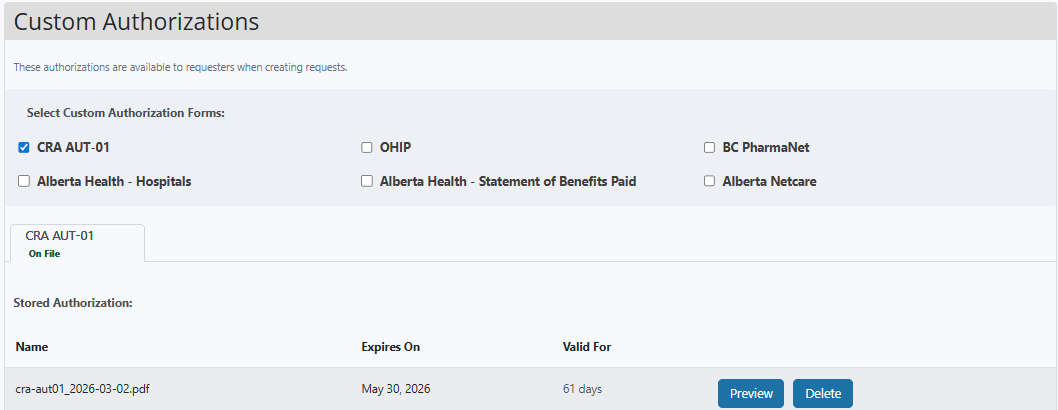
Good news! This part just got easier. The AUT-01 form is now built into Tracument for Full Service Requests under Matters > Administration.
- Send the form directly to your client for signature (just make sure their email is included in the matter)
-
There are two main benefits to sending the form through
Tracument's auto-signature feature:
- The system will ensure the form is completed correctly the first time.
- The system will handle all client communications and let you know when the form is ready to use; it's “send it and forget it” for you.
4. Additional Identification Requirements
All requests must now include:
- Two (2) pieces of valid government-issued ID
- At least one must include a photo (e.g. a driver's license or passport)
5. Substitute Decision Makers
If someone is signing as a substitute decision maker, a bit more documentation is required:
- Two (2) pieces of ID for the decision maker
- Supporting legal documents (e.g. Power of Attorney, Guardian and Trustee documents, Will, or Certificate of Appointment of Estate Trustee)
6. Updated Submission Address
All requests must now be sent to the CRA ATIP office in Ottawa:
555 MacKenzie Avenue, Ottawa
Be sure to select the verified organization in your system and follow the notes carefully.

More Information
For more information, please watch our video update (above), where our CEO, David Swadden, walks through the CRA changes alongside our QA Manager, Carolina.
If you need any additional support navigating these updates, feel free to reach out to us anytime at support@tracument.com.
CRA Requests Made Simple
These requests don't have to be complicated.
We can help. With FSR, your clients sign once, and we take care of the rest — making the process smoother and far less hands-on for your team.
Book a call with us today to see how we can simplify your CRA requests.
You may also like

Celebrating Legal Administrative Professionals’ Day!
April 21, 2026
Featuring our winner of our 2026 Outstanding Administrative Professional Award! Celebrate with us!

March 2026 Tracument Update
March 30, 2026
We're releasing two new features and a major enhancement! Learn how the latest improvements boost performance and workflow...

Happy Holidays Message from David Swadden, CEO
December 18, 2025
We would like to wish all our clients and readers a wonderful holiday season filled with joy and laughter.